• Skip to main content
  • Skip to footer

LinkedSuperpowers HomepageLinkedSuperpowers

Rise as an OLYMPIAN Thought Leader

  • Home
  • Solutions
    • LinkedSuperpowers
    • PRSuperpowers
    • Strategic Personal Brand Advisory
  • About Us
    • Press & News
    • Testimonials
  • Blog
  • Contact
  • Work with Us

LinkedIn Profile Optimization – First Things First!

LinkedIn Profile Optimization – First Things First!

Before you begin any effort towards optimizing your profile you need to develop your overall LinkedIn strategy and answer 2 very important questions:

1. What is your purpose on LinkedIn?

Initially you must understand why you are participating on LinkedIn. Your answer will guide you not only in terms of the way that you will build your LinkedIn Profile, but also will determine who you connect with, what you post, the groups you join etc.

Some examples of purpose entail:

  • Increasing your customers.
  • Looking for a job.
  • Building relationships with individuals in certain industries.
  • Searching for partners and collaborators.
  • Becoming a thought leader in your field.

As you might have guessed, each of the above purposes might make you use LinkedIn in a certain way.

2. Who are the people you want to reach?

In order to use LinkedIn more efficiently, you have to not only identify the type of people you want to reach but also you will have dig deeper and try to determine their wants and needs and what “job” are they trying to accomplish.

When you have answers to these two questions, then you can begin taking the relevant steps towards profile optimization.

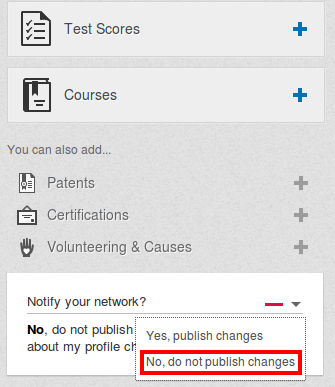
However, before you start building or making changes to your existing LinkedIn profile, you have to turn off the relevant Notifications settings in order to avoid informing your connections of every single change you make to your profile and thus risk becoming annoying.

Edit Profile on LinkedIn

You do this by selecting “Profile” ⇨ “Edit Profile” and then selecting “No, do not publish changes” at the “Notify your Network?” box located on the right hand side of your page (as seen on the image below):
No, do not publish changes

Once you are finished with your profile editing, you can turn back on these Notifications by selecting “Yes, publish changes” at the same box.

Related Posts:

  • How to Rock Your LinkedIn Profile Picture!

    In this post we are going to talk about a very interesting section of your LinkedIn Profile and one of…

  • 3 Reasons an Optimized LinkedIn Profile is Critical for Entrepreneurs

    Here's what you are missing if you are an Entrepreneur and your LinkedIn Profile isn't Optimized: We want to do…

  • How to create Influence on LinkedIn: 7 “Must-Haves” for your LinkedIn Summary

    This Post was written with Elaina Zuker -  Management Training, Leadership Development, “Secrets of Influence”. When creating or upgrading your…

Footer

Find out how we can become your secret superpower on LinkedIn and beyond…

Copyright © 2026 LinkedSuperPowers. All rights reserved | Privacy Notice
* Our Services are Non-Refundable.

We use cookies on our website to give you the most relevant experience by remembering your preferences and repeat visits. By clicking “Accept All”, you consent to the use of ALL the cookies. However, you may visit "Cookie Settings" to provide a controlled consent.
Cookie SettingsAccept All
Manage consent

Privacy Overview

This website uses cookies to improve your experience while you navigate through the website. Out of these, the cookies that are categorized as necessary are stored on your browser as they are essential for the working of basic functionalities of the website. We also use third-party cookies that help us analyze and understand how you use this website. These cookies will be stored in your browser only with your consent. You also have the option to opt-out of these cookies. But opting out of some of these cookies may affect your browsing experience.
Necessary
Always Enabled
Necessary cookies are absolutely essential for the website to function properly. These cookies ensure basic functionalities and security features of the website, anonymously.
CookieDurationDescription
cookielawinfo-checkbox-analytics11 monthsThis cookie is set by GDPR Cookie Consent plugin. The cookie is used to store the user consent for the cookies in the category "Analytics".
cookielawinfo-checkbox-functional11 monthsThe cookie is set by GDPR cookie consent to record the user consent for the cookies in the category "Functional".
cookielawinfo-checkbox-necessary11 monthsThis cookie is set by GDPR Cookie Consent plugin. The cookies is used to store the user consent for the cookies in the category "Necessary".
cookielawinfo-checkbox-others11 monthsThis cookie is set by GDPR Cookie Consent plugin. The cookie is used to store the user consent for the cookies in the category "Other.
cookielawinfo-checkbox-performance11 monthsThis cookie is set by GDPR Cookie Consent plugin. The cookie is used to store the user consent for the cookies in the category "Performance".
viewed_cookie_policy11 monthsThe cookie is set by the GDPR Cookie Consent plugin and is used to store whether or not user has consented to the use of cookies. It does not store any personal data.
Functional
Functional cookies help to perform certain functionalities like sharing the content of the website on social media platforms, collect feedbacks, and other third-party features.
Performance
Performance cookies are used to understand and analyze the key performance indexes of the website which helps in delivering a better user experience for the visitors.
Analytics
Analytical cookies are used to understand how visitors interact with the website. These cookies help provide information on metrics the number of visitors, bounce rate, traffic source, etc.
Advertisement
Advertisement cookies are used to provide visitors with relevant ads and marketing campaigns. These cookies track visitors across websites and collect information to provide customized ads.
Others
Other uncategorized cookies are those that are being analyzed and have not been classified into a category as yet.
SAVE & ACCEPT